Reminders
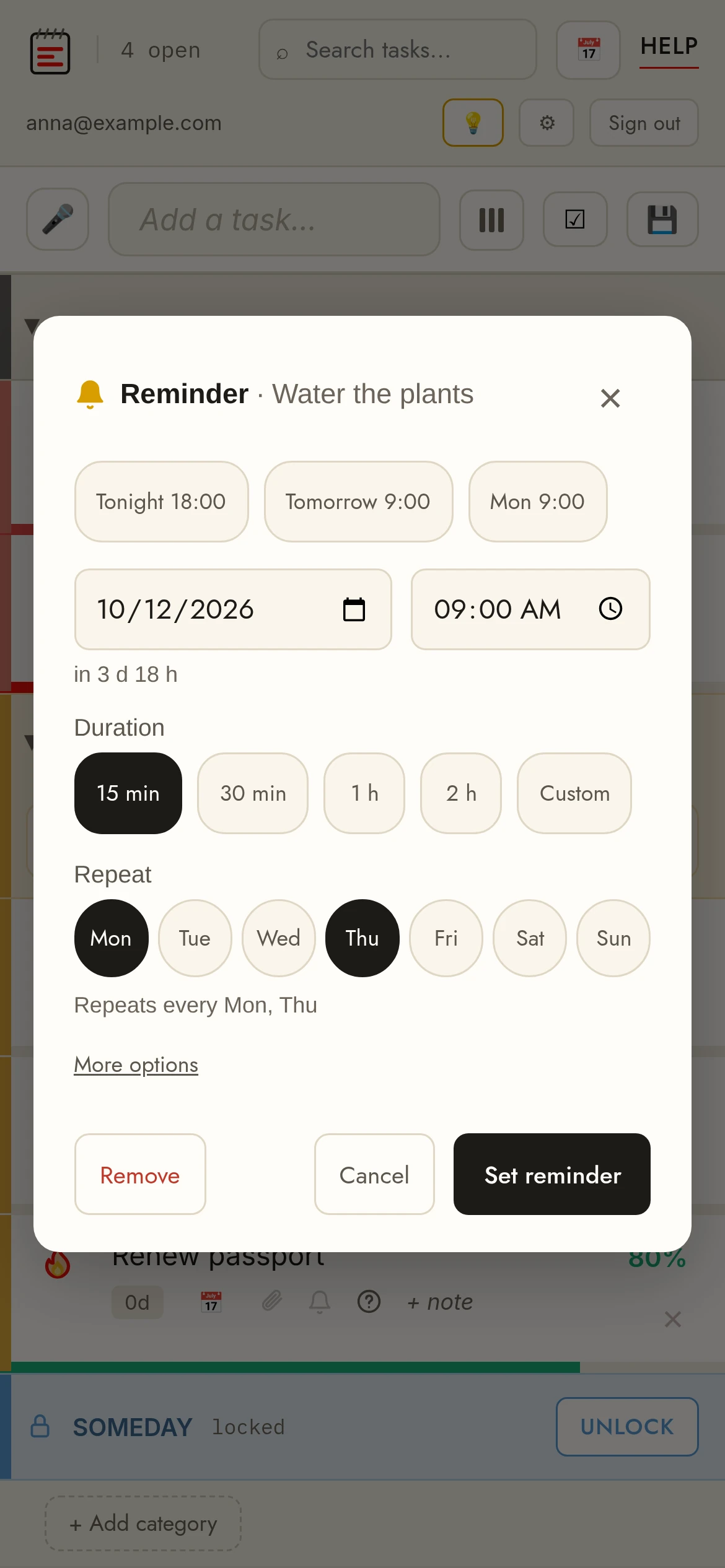
Set a reminderClick the 🔔 bell on a row. Pick a quick option (Tonight, Tomorrow, Monday) or set any date and time — the preview shows how far away it is. The bell turns yellow when scheduled.
Smart addType the time right in the new-task box — "pick up keys at 22:00", "call mom tomorrow 18:30", "stretch in 30 min", "10pm", "on monday". A chip under the box shows the detected reminder; Enter adds the task with it, the chip's × (or Esc) keeps the text as typed. Pro feature.
RepeatIn the same popup, tick the days the task repeats on (Mo–Su): none = one time, Mon + Wed = every Monday and Wednesday, all seven = every day. More options adds every N days or weeks, hourly, monthly (same date or e.g. the 1st Sunday) and yearly.
When it firesYou get a notification on every device where you allowed them — even with the site closed. Clicking it opens your list. A one-time reminder then shows a red bell until you snooze it (1 hour / tomorrow) or remove it, so you can't miss it.
NotificationsYour browser asks permission the first time you set a reminder — allow it to get popups. iPhone/iPad: first add TasksPage to your home screen (Share → Add to Home Screen) and open it from there; Safari only delivers notifications to installed pages. Without permission, reminders still work inside the app (red bell).
Google CalendarReminders can also show up in Google Calendar, in their own “TasksPage” calendar, for the reminder’s duration; repeating ones as a series. One-way, Pro. How Google Calendar sync works.