The best simple to-do list apps in 2026
If you just want to open a page and start ticking things off, TasksPage is our pick for the best simple to-do list app in 2026: a free, single-page task tracker that works with no account and buries the usual project-manager bloat. That said, it is a new, small product with real trade-offs, so below we rank six genuinely good options and say honestly where each one wins and where it loses.
Updated:
How we judged "simple"
Simple does not mean feature-poor. It means low friction: you should be able to capture a task in seconds without wrestling with projects, labels, boards and filters you never asked for. We weighted four things heavily.
- Time-to-first-task — can you just start, or must you create an account first?
- Single-view clarity — is everything visible on one page, or scattered across lists and views?
- Honest free tier — is it genuinely usable for free, or a trial in disguise?
- Cross-device reach — native apps, sync and integrations, where you need them.
No single app wins on all four, which is why the ranking below depends on what you personally value.
The best simple to-do list apps in 2026, ranked
1. TasksPage — best for one-page simplicity and zero bloat
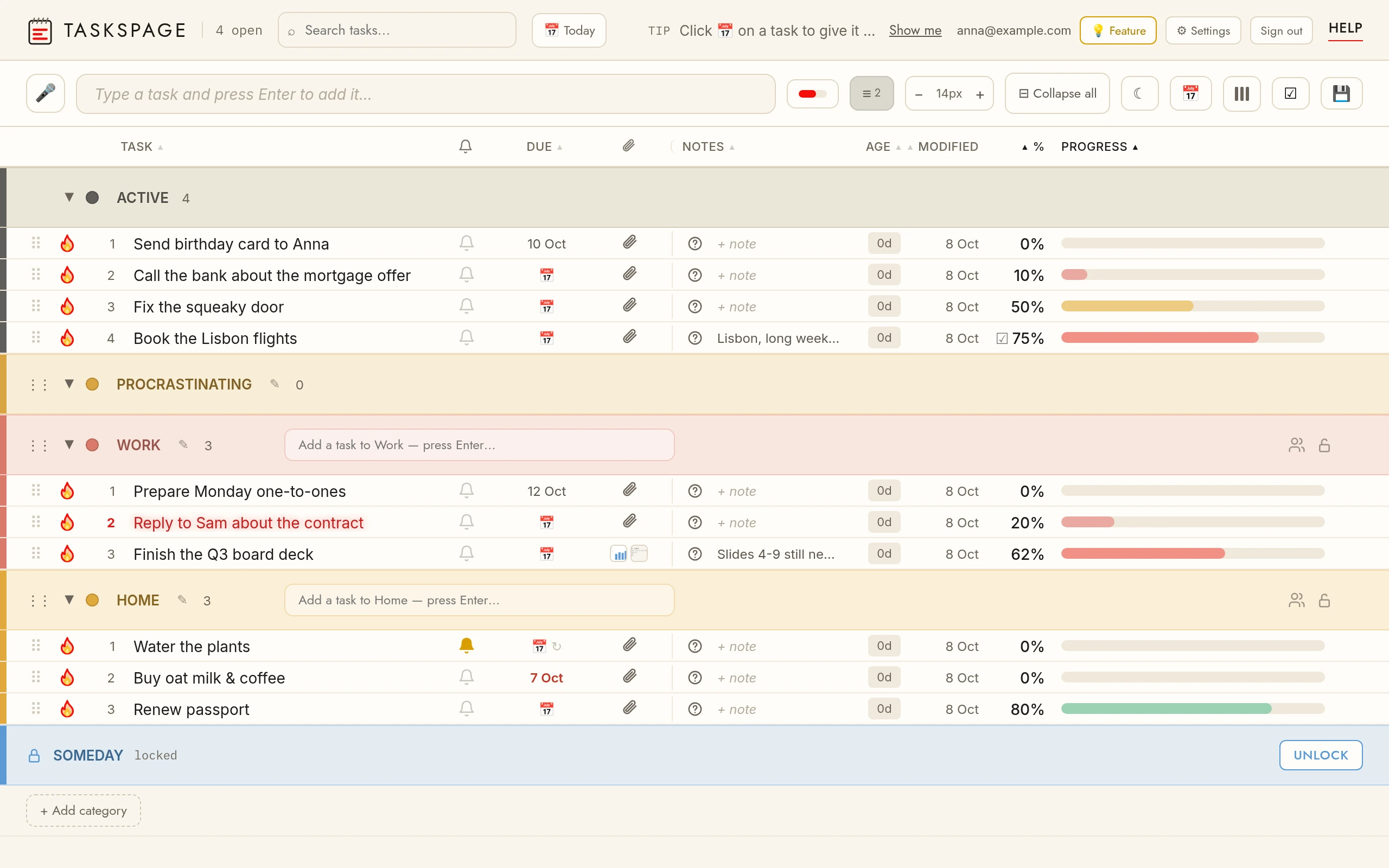
TasksPage is a free, single-page web to-do list where every task carries a progress percentage you set by dragging, and tasks auto-sort by completion so the nearly-done work rises to the top. You can use it with no account at all (an optional free account only adds cross-device sync), plus colour categories, notes, file attachments, instant search, offline PWA install and a satisfying burn-to-done animation with undo. It is free forever with no ads and no tracking without your consent; Pro is €1.99/mo or €19.99/yr for unlimited categories, reminders, recurring tasks, Google Calendar sync and calendar export.
The honest cons: it is new and small, so the ecosystem is thin. There is no iPhone app (on iPhone you install the PWA from Safari; Android has an app on Google Play), no team workspaces, assignees or comments, no other third-party integrations like Slack, calendar sync-in or Zapier, and no natural-language recurrence or project parsing. If you need any of those, one of the apps below will serve you better. Best for: people who want a personal, everything-on-one-page checklist without signing up. Price: free; Pro €1.99/mo or €19.99/yr.
2. Todoist — best all-rounder
Todoist is the polished veteran: best-in-class natural-language quick-add (type "Pay rent every 1st at 9am #Home" and it parses the date, recurrence and project), rock-solid sync, and apps literally everywhere. The free "Beginner" plan is genuinely usable but caps you at 5 active projects and gives automatic reminders only; custom reminders and more projects need Pro (from $5/mo billed annually). The catch for simplicity-seekers: it requires an account, is cloud-only, and its projects, labels, filters and Karma can feel like overkill for a plain list. Best for: people who want structure and integrations. See TasksPage vs Todoist.
3. TickTick — best all-in-one
TickTick bundles tasks, a calendar, a habit tracker, a Pomodoro timer and the Eisenhower Matrix into one app, with strong natural-language capture and one cheap paid tier (Premium $3.99/mo, or $35.99–$49.99/yr depending on promotion). The free plan is fair but capped (9 lists, 99 tasks per list, one attachment a day), and all those extra tools add menus and clutter you don't need for a single page. It also requires an account with no guest mode. Best for: people who want tasks plus habits and focus in one place. See TasksPage vs TickTick.
4. Any.do — best free daily planner
Any.do pairs an unusually generous free tier (effectively unlimited tasks and lists, full sync, no card required) with a clean "My Day" view that shows tasks alongside calendar events. Recurring tasks, location and WhatsApp reminders, colour tags and AI features sit behind Premium ($4.99/mo billed annually, $7.99 monthly), and the upsell messaging can feel pushy. As a full task-and-calendar app it is more structure than a one-page list needs, and it requires an account. Best for: daily planners who like tasks and calendar side by side. See TasksPage vs Any.do.
5. Microsoft To Do — best free if you live in Microsoft 365
Microsoft To Do is completely free with a Microsoft account, with no ads and no paywalled core features: unlimited lists and tasks, My Day, due dates, reminders, recurring tasks, steps, notes, attachments and list sharing, syncing across web, Windows, Mac, iOS and Android. It integrates deeply with Outlook, so flagged emails appear automatically. The downsides for a simple-list purist: you must sign into a Microsoft account, everything is cloud-only, and it is built around multiple lists plus My Day rather than one flat page. Best for: Outlook and Microsoft 365 users. See TasksPage vs Microsoft To Do.
6. TeuxDeux — best paper-planner feel
TeuxDeux is a beautifully minimal, calendar-style list styled like a paper planner, with automatic carryover of unfinished tasks and genuine sync across web, iOS, iPad and Android. But it is subscription-only after a 7-day trial ($3/mo billed annually, or $4/mo monthly) — there is no permanent free tier — and it requires an account. Its day-and-week layout is also more structure than a single flat checklist, with no folders, tags or priorities. Best for: people who want a digital day planner and don't mind paying. See TasksPage vs TeuxDeux.
Quick comparison table
| App | Free tier | Best for | Sign-up needed | From $ |
|---|---|---|---|---|
| TasksPage | Free forever (no ads) | One-page simplicity, zero bloat | No (optional for sync) | €1.99/mo (Pro) |
| Todoist | Free "Beginner" (5 projects) | All-round power and integrations | Yes | $5/mo (annual) |
| TickTick | Free (capped lists/tasks) | Tasks + habits + focus in one | Yes | $3.99/mo |
| Any.do | Free (generous) | Daily planner with calendar | Yes | $4.99/mo (annual) |
| Microsoft To Do | Free (all core features) | Outlook / Microsoft 365 users | Yes (Microsoft account) | Free |
| TeuxDeux | None (7-day trial) | Paper-planner feel | Yes | $3/mo (annual) |
Prices are the lowest advertised paid entry point and can change with promotions or billing period; check each provider for current figures.
So which simple to-do app should you pick?
Match the tool to what you actually value:
- Want to just open a page and type, no account, everything on one screen? TasksPage — as long as you don't need native mobile apps, teams or integrations.
- Want the most capable all-rounder with the best quick-add? Todoist.
- Want tasks plus habits and a focus timer in one app? TickTick.
- Want a generous free daily planner? Any.do.
- Already in Outlook or Microsoft 365? Microsoft To Do, free.
- Want a paper-planner feel and don't mind paying? TeuxDeux.
The honest summary: TasksPage wins on pure, account-free, one-page simplicity, but the established apps win on ecosystem, native mobile apps and integrations. Pick the one whose trade-offs you can live with.
Key facts
| Price | Free forever. Pro is optional: €1.99 per month or €19.99 per year, billed in euro worldwide. Everyone gets Pro free for the first 3 months, no card needed. |
|---|---|
| Sign-up required | No. An account is only needed for sync across devices, attachments and sharing. |
| Works offline | Yes. Installable web app (PWA); offline edits sync when you are back online. |
| Platforms | Any modern browser on desktop, tablet and phone, plus an Android app on Google Play. No iPhone app (installable PWA via Add to Home Screen). |
| Attachments | Free: up to 5 MB per file, 50 MB in total. Pro: up to 25 MB per file, 5 GB in total. |
| Sharing | Share a colour category with up to 10 people, free. |
| Languages | English, German, Spanish, French, Portuguese, Russian. |
| Privacy | No ads, no tracking without your consent. Data encrypted at rest; export or delete everything from the app. |
Related pages
Frequently asked
What is the simplest to-do list app?
For pure simplicity, TasksPage is hard to beat: it is a single-page web to-do list you can open and start typing in with no account, no setup and no projects-and-labels overhead. TeuxDeux is also very minimal, though it requires signing in and is paid-only after a trial. The right answer depends on whether you want everything on one flat page or a lightweight add-on to tools you already use.
What is the best free to-do list app?
Several are genuinely free. TasksPage is free forever with no ads and no tracking without your consent and needs no account. Microsoft To Do is free with all core features if you have a Microsoft account, and Any.do has an unusually generous free tier. Todoist and TickTick offer usable free plans too, but cap projects, lists or tasks. TeuxDeux is the outlier with no permanent free tier.
What is the best to-do list with no sign-up?
TasksPage is the standout here: you can add and complete tasks with no account at all, and only create a free account if you later want to sync across devices. Almost every other mainstream app — Todoist, TickTick, Any.do, Microsoft To Do and TeuxDeux — requires you to create or sign into an account before you can add a single task, because they are built around cloud sync.
Does TasksPage have a mobile app?
On Android, yes: TasksPage is on Google Play (the same page, packaged for Android). There is no iPhone app; on iPhone you install it as a PWA (progressive web app) from Safari, which gives you an icon and offline use. If a native mobile app matters to you, Todoist, TickTick, Any.do or Microsoft To Do are stronger choices.
Is TasksPage secure and private?
TasksPage runs no ads and no tracking without your consent, and you can use it without an account at all. You can password-protect any category; note this is server-side password-gating with encryption at rest, not end-to-end encryption, and there is no password recovery, so store your password safely. If you need enterprise-grade security or team access controls, an established provider may suit you better.
One page. No sign-up. Start now.
Open TasksPage