A simpler, no-sign-up Microsoft To Do alternative
If you want a Microsoft To Do alternative that skips the account, the multiple lists and the ecosystem, TasksPage is worth a look. It is a free, single-page to-do list you can start using with no sign-up — every task gets a progress percentage, and the whole list auto-sorts by how done you are. It is genuinely simpler than Microsoft To Do, but it is also a new, small indie tool with no iPhone app and no team workspaces, assignees or comments, so this page is honest about where Microsoft To Do wins.
Updated:
The short version
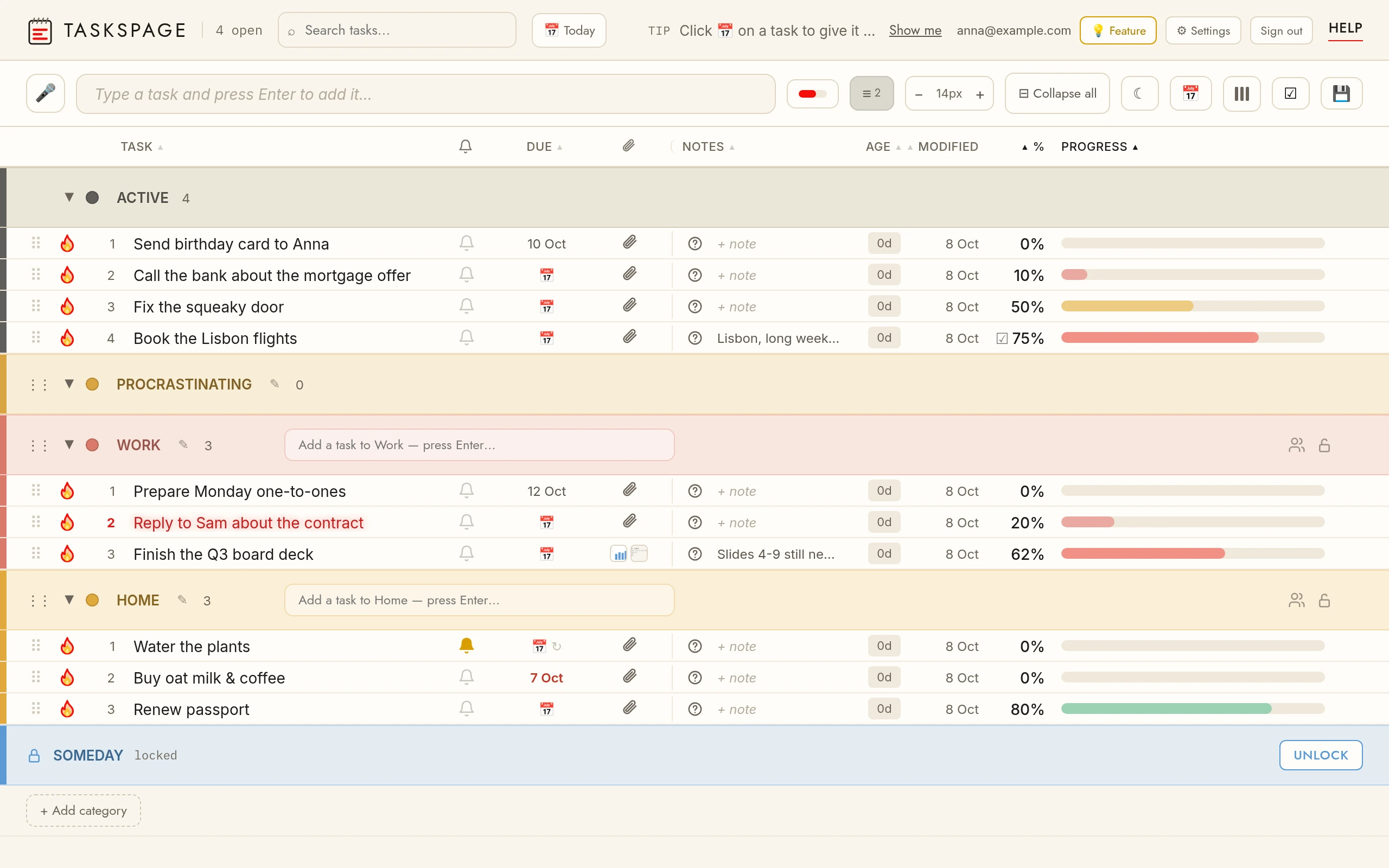
Microsoft To Do is a polished, completely free task app that syncs everywhere — but it requires a Microsoft account before you can add a single task, and it structures your work into multiple lists plus a "My Day" view. TasksPage takes the opposite approach: one flat page, no account required, and a progress bar on every task.
- Choose TasksPage if you want to open a browser, start typing, and keep everything on one page with zero setup and zero ecosystem lock-in.
- Choose Microsoft To Do if you already live in Outlook and Microsoft 365, want native iOS/Android apps, or need list sharing and reminders that sync across every device.
TasksPage vs Microsoft To Do at a glance
| TasksPage | Microsoft To Do | |
|---|---|---|
| Sign-up required | No — works with no account (optional free account only for cross-device sync) | Yes — a personal or work/school Microsoft account is required before you can add any task |
| Price of a usable plan | Free forever; optional Pro €1.99/mo or €19.99/yr (first 3 months free, no card) | Free with a Microsoft account; no paid tier for the app itself |
| Best for | Personal, single-page lists with zero setup | People in the Microsoft/Outlook ecosystem who want cross-device sync |
| Layout | Everything on one flat page; tasks auto-sort by completion | Multiple separate lists plus a "My Day" daily planner |
| Progress tracking | Drag a progress percentage on every task | Steps/subtasks and tick-to-complete (no percentage) |
| Privacy / offline | Works offline as an installable PWA; no tracking without your consent | Cloud-only; every task syncs to Microsoft's servers |
| Mobile apps | Android app (Google Play); on iPhone an installable PWA | Yes — dedicated iOS and Android apps, plus Windows and Mac |
| Team sharing & integrations | Share a category with up to 10 people (free; they need a free account); Google Calendar sync on Pro (one-way). No team workspaces, assignees or comments | List sharing plus deep Outlook / Microsoft 365 integration |
What makes TasksPage different
TasksPage is built around one idea: everything on one page, with no project-manager bloat. A few things you won't find in Microsoft To Do:
- A progress percentage on every task — drag to set how far along you are, and the list re-sorts automatically so the nearly-done and not-started items separate themselves.
- No account needed — this is a real Microsoft To Do alternative with no sign-up. Open the page and start typing; add a free account later only if you want cross-device sync.
- Colour categories you can password-protect — five colours free, unlimited on Pro, with server-side password-gating on any category (note: this is access-gating, encrypted at rest — not end-to-end encryption, and there is no password recovery).
- Notes, questions, file attachments (5 MB per file free / 5GB Pro), instant search, drag-and-drop reorder, a burn-to-done animation with undo, and offline use as an installable PWA.
Pro (€1.99/mo or €19.99/yr) adds unlimited categories, reminders, recurring tasks, Google Calendar sync, calendar/ICS export, more storage and a request-a-feature line. No ads, no tracking without your consent, on either tier.
When Microsoft To Do is the better choice
To be fair, Microsoft To Do is an excellent app and beats TasksPage in several real ways. Pick it if:
- You want native mobile apps. Microsoft To Do has dedicated iOS and Android apps alongside Windows, Mac and web, all syncing seamlessly. TasksPage has an Android app on Google Play, but on iPhone only an installable PWA.
- You live in Outlook / Microsoft 365. Flagged emails and Outlook Tasks appear in To Do automatically. TasksPage has no third-party integrations — the only exceptions are Google Calendar sync and a calendar (.ics) export, both on Pro — no Slack, no calendar sync-in, no Zapier, no email-to-task.
- You need to share lists or use "My Day". Microsoft To Do offers list sharing and a genuinely useful daily planner. TasksPage is personal-first: the free plan can share individual colour categories with up to 10 people, but there are no team workspaces, assignees or comments.
- You want a mature, free, feature-complete app. Microsoft To Do is completely free with no ads or paywalls, and it is a well-established product. TasksPage is a new, small indie tool with a smaller ecosystem.
In short: if you want breadth, mobile apps, sharing and ecosystem integration, Microsoft To Do is the stronger pick. If you want one page and no friction, keep reading.
Try it in ten seconds
The honest test is just to open it. No account, no install, no card. If it clicks, add a free account for sync — if not, you've lost nothing.
Open TasksPage — or see how it stacks up against every option in the full comparison of simple to-do list apps.
Key facts
| Price | Free forever. Pro is optional: €1.99 per month or €19.99 per year, billed in euro worldwide. Everyone gets Pro free for the first 3 months, no card needed. |
|---|---|
| Sign-up required | No. An account is only needed for sync across devices, attachments and sharing. |
| Works offline | Yes. Installable web app (PWA); offline edits sync when you are back online. |
| Platforms | Any modern browser on desktop, tablet and phone, plus an Android app on Google Play. No iPhone app (installable PWA via Add to Home Screen). |
| Attachments | Free: up to 5 MB per file, 50 MB in total. Pro: up to 25 MB per file, 5 GB in total. |
| Sharing | Share a colour category with up to 10 people, free. |
| Languages | English, German, Spanish, French, Portuguese, Russian. |
| Privacy | No ads, no tracking without your consent. Data encrypted at rest; export or delete everything from the app. |
Related pages
Frequently asked
Is there a free Microsoft To Do alternative?
Yes. TasksPage is free forever with no ads and no tracking without your consent. It covers the core of a to-do list — tasks, categories, notes, search, attachments and offline use — and adds a progress percentage on every task. An optional Pro plan (€1.99/mo or €19.99/yr) adds reminders, recurring tasks, Google Calendar sync, calendar export and more. Note that Microsoft To Do is itself free, so the real difference is approach, not price: TasksPage needs no account and keeps everything on one page.
Can I use a Microsoft To Do alternative without an account?
Yes — that's a core reason to choose TasksPage. It works with no sign-up: open the page and start adding tasks immediately. Microsoft To Do, by contrast, requires you to sign in with a Microsoft account before you can add anything. With TasksPage, you only need a free account if you want to sync across devices.
How is TasksPage simpler than Microsoft To Do?
Microsoft To Do organises work into multiple separate lists plus a "My Day" view. TasksPage puts everything on one flat page that auto-sorts by completion, with a drag-to-set progress percentage on each task. There are no projects, boards or ecosystem features to configure — it is deliberately built for personal, single-page use.
Does TasksPage have mobile apps like Microsoft To Do?
Partly. TasksPage has an Android app on Google Play (the same page, packaged for Android). There is no iPhone app: on iPhone it is a web app you install as a PWA from Safari, which works offline and adds a home-screen icon. Microsoft To Do has native iOS and Android apps, so if native mobile apps are essential, Microsoft To Do is the better choice.
Can TasksPage sync with Outlook or other tools?
No. TasksPage has no other third-party integrations — no Outlook or calendar sync-in, no Slack, no Zapier, no email-to-task. Microsoft To Do integrates deeply with Outlook and Microsoft 365, so flagged emails and Outlook Tasks appear automatically. If that ecosystem integration matters to you, Microsoft To Do wins.
Is my data private with TasksPage?
TasksPage works offline (installable PWA), needs no account, and does no tracking without your consent. Any category can be password-protected — this is server-side access-gating with data encrypted at rest, not end-to-end encryption, and there is no password recovery, so keep your password safe. Microsoft To Do is cloud-only, syncing every task to Microsoft's servers, which is convenient but not a local, offline-first option.
One page. No sign-up. Start now.
Open TasksPage