TasksPage: a free, simpler than TeuxDeux alternative
If you want a TeuxDeux alternative that is free and needs no sign-up, TasksPage is the closest fit: a single-page to-do list you can open and start typing in immediately, free forever, with an optional account only for cross-device sync. TeuxDeux is a polished, paid daily planner with genuine mobile apps; TasksPage is a leaner, free personal list. Below is an honest look at where each one wins.
Updated:
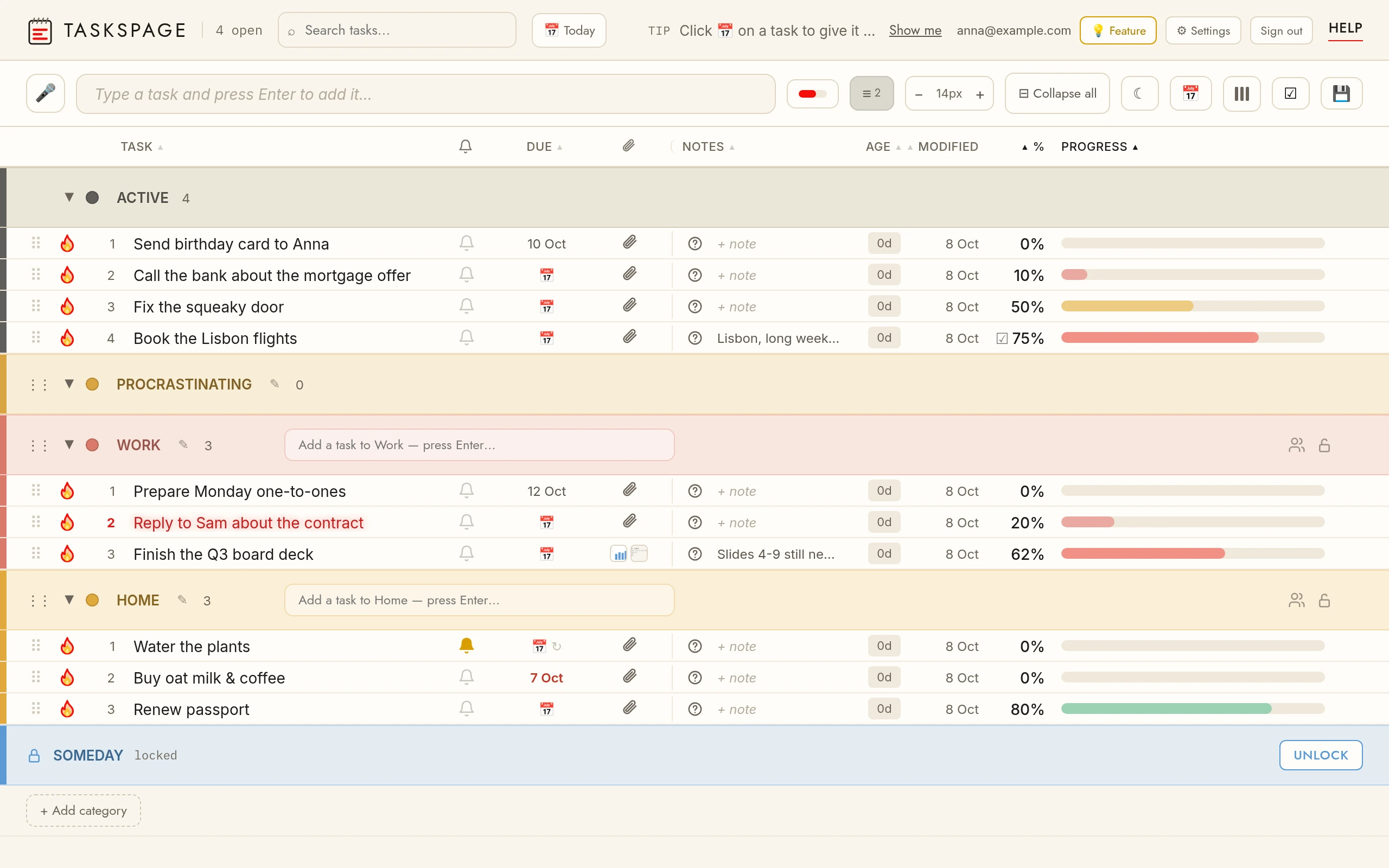
The short version
TasksPage and TeuxDeux both reject bloat, but they draw the line in different places. TeuxDeux organises your life into a scrolling row of days, syncs across native iOS, iPad and Android apps, and charges a subscription after a 7-day trial. TasksPage keeps everything on one flat page, is free forever with no ads and no tracking without your consent, and lets you start without an account at all.
The trade-off is real and worth stating up front: TasksPage is a new, small indie product. It has no iPhone app (on iPhone it is an installable web app / PWA; Android has an app on Google Play), no team workspaces, and no other third-party integrations. If those matter to you, TeuxDeux or another tool may serve you better, and we say where below.
TasksPage vs TeuxDeux at a glance
| TasksPage | TeuxDeux | |
|---|---|---|
| Sign-up required | No — use it anonymously; optional free account only for sync | Yes — you must create an account before using it (trial needs no card) |
| Price of a usable plan | Free forever; Pro €1.99/mo or €19.99/yr optional (first 3 months free, no card) | Paid-only after 7-day trial: $3/mo billed yearly ($36/yr) or $4/mo monthly |
| Best for | One flat personal checklist, zero bloat | A day-by-day paper-planner-style daily list |
| Layout | Single page; tasks auto-sort by completion | Calendar-style columns of days/weeks |
| Progress tracking | Drag a percentage on each task; auto-sort | Simple done / not-done check-off |
| Mobile | Android app (Google Play); on iPhone an installable PWA | Native iOS, iPad and Android apps |
| Privacy extras | Password-protect categories, file attachments, works offline | Not offered |
Where TasksPage is the simpler, cheaper choice
TasksPage is built to be the fastest way to keep a personal list without paying or signing in.
- Free, and free without an account. Open the page and type. TeuxDeux requires an account and a paid subscription once the 7-day trial ends, so even a plain personal list costs money on an ongoing basis.
- Everything on one page. No days, weeks or columns to scroll — just one list. Each task carries a progress percentage you set by dragging, and the list auto-sorts by completion.
- More than a checklist, still zero bloat. Colour categories (5 free, unlimited on Pro), notes, questions, instant search, drag-and-drop reordering, and a burn-to-done animation with undo.
- Private by design. No ads, no tracking without your consent. You can password-protect any category (server-side gating, encrypted at rest — note this is not end-to-end encryption, and there is no password recovery), and it works offline as an installable app.
- Cheaper Pro. €1.99/mo or €19.99/yr adds unlimited categories, reminders, due dates, recurring tasks, Google Calendar sync, calendar/ICS export, and 5GB of attachments — below TeuxDeux's $36/yr.
When TeuxDeux is the better choice
To be fair, TeuxDeux is a mature, well-loved product and does several things TasksPage simply does not.
- Real native mobile apps. TeuxDeux ships native iOS, iPad and Android apps with genuine cross-device sync. TasksPage offers an Android app on Google Play and an installable PWA, but no iPhone app — if a polished native phone app matters, TeuxDeux wins outright.
- Automatic day-to-day carryover. Any task you don't finish rolls forward to the next day on its own. That daily-planner rhythm is the heart of TeuxDeux and something TasksPage's single flat list doesn't replicate.
- A proven, stable track record. TeuxDeux has been actively maintained with a deliberately minimal feature set since the early 2010s. TasksPage is new and small by comparison.
- Paper-planner feel. If you think in days and weeks and like a calendar-style layout, TeuxDeux's structure fits that mental model better than one flat page.
Also be clear on TasksPage's limits regardless: no team workspaces, assignees or comments, no other integrations (Slack, calendar sync-in, Zapier, email-to-task), and no natural-language recurrence or project parsing. It is deliberately for personal, single-page use — not projects or teams.
Try it in one click
The honest test is to open both and see which layout fits your brain. TasksPage costs nothing and needs no account, so there's no barrier to trying.
Open TasksPage or read the full comparison of simple to-do list apps.
Key facts
| Price | Free forever. Pro is optional: €1.99 per month or €19.99 per year, billed in euro worldwide. Everyone gets Pro free for the first 3 months, no card needed. |
|---|---|
| Sign-up required | No. An account is only needed for sync across devices, attachments and sharing. |
| Works offline | Yes. Installable web app (PWA); offline edits sync when you are back online. |
| Platforms | Any modern browser on desktop, tablet and phone, plus an Android app on Google Play. No iPhone app (installable PWA via Add to Home Screen). |
| Attachments | Free: up to 5 MB per file, 50 MB in total. Pro: up to 25 MB per file, 5 GB in total. |
| Sharing | Share a colour category with up to 10 people, free. |
| Languages | English, German, Spanish, French, Portuguese, Russian. |
| Privacy | No ads, no tracking without your consent. Data encrypted at rest; export or delete everything from the app. |
Related pages
Frequently asked
Is there a free TeuxDeux alternative?
Yes. TeuxDeux is paid-only after a 7-day trial ($36/yr billed annually or $4/mo monthly), but TasksPage is free forever with no ads and no tracking without your consent. TasksPage also offers an optional Pro plan at €1.99/mo or €19.99/yr for extras like reminders, recurring tasks and Google Calendar sync, but the core app stays free.
Can I use a TeuxDeux alternative without an account?
TeuxDeux requires you to create an account before you can use it. TasksPage does not — you can open the page and start adding tasks anonymously. You only need a free account if you want to sync the same list across multiple devices.
Does TasksPage have mobile apps like TeuxDeux?
Partly. TasksPage has an Android app on Google Play (the same page, packaged for Android); on iPhone and iPad it is an installable web app (PWA) you add from Safari. TeuxDeux ships native iOS, iPad and Android apps, so if a polished native phone app is essential, TeuxDeux is the better pick.
How is TasksPage simpler than TeuxDeux?
TasksPage keeps everything on one flat page instead of TeuxDeux's calendar-style columns of days and weeks. Each task has a drag-to-set progress percentage and the list auto-sorts by completion, so there's no day-by-day structure to manage if you just want a single checklist.
Can I move my tasks from TeuxDeux to TasksPage?
There is no automated importer. TasksPage has no other third-party integrations or migration tools, so you would re-enter tasks manually. Because you can start on TasksPage with no sign-up, it's quick to trial alongside TeuxDeux before deciding.
One page. No sign-up. Start now.
Open TasksPage