A to-do list that works offline — no wifi, no problem
Todo apps became project managers. Project managers became second jobs. TasksPage is one page — add, drag, burn, done. And because it installs as a proper app, it keeps working when the internet doesn't. Open it on a plane, in a tunnel, or with the wifi down — your list is right there, and your changes save when you reconnect.
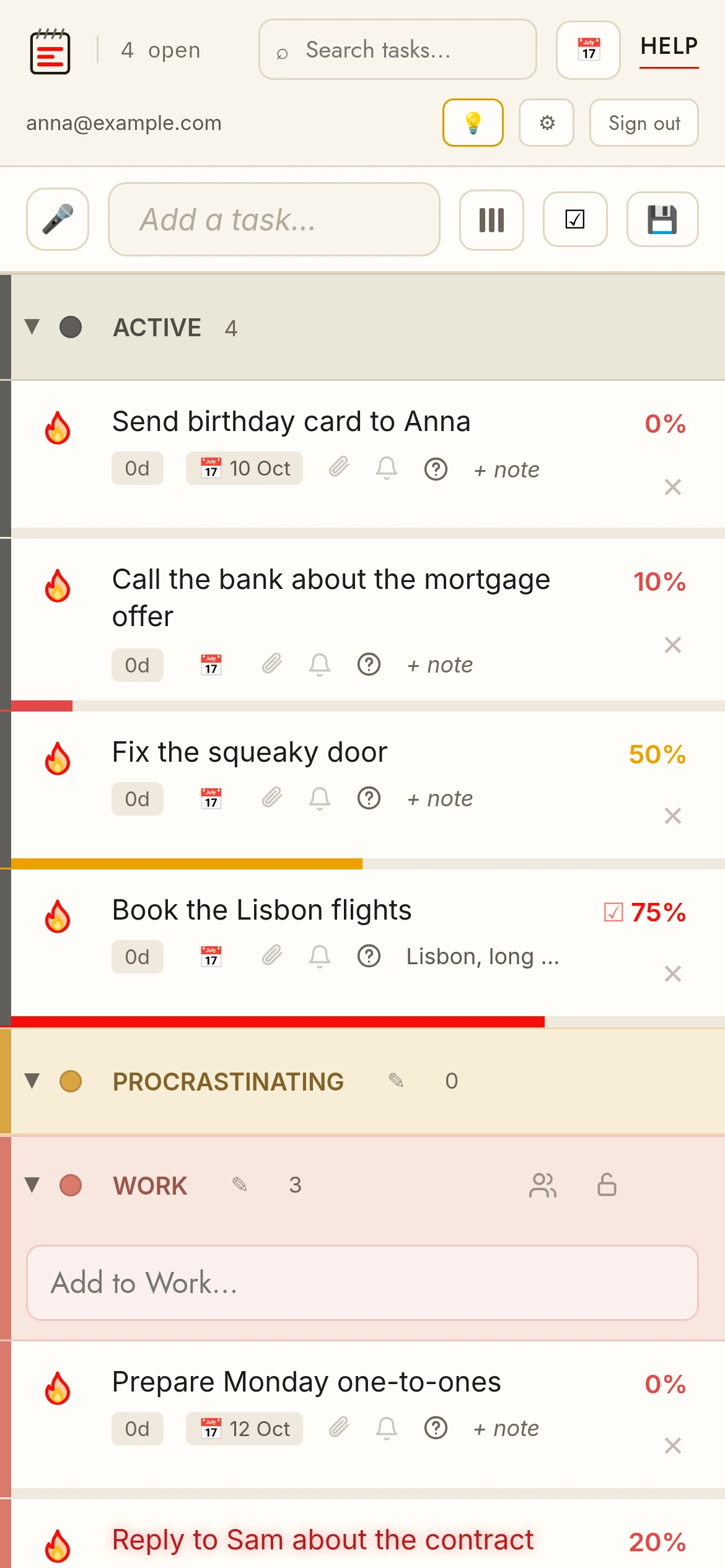
Why an offline to-do list in your browser actually matters
Most task apps are useless the moment your connection drops. You open them and stare at a spinner. TasksPage is built as a PWA to-do list — a real installable app with a service worker — so the whole thing runs from your device.
That means you can capture a task the second it lands in your head, no matter where you are:
- On a flight with no wifi
- Underground on the subway
- In a dead zone or with the router down
You add, edit, reorder, and set progress like normal. When you're back online, your changes save automatically. A task list with no internet isn't a fallback here — it's the point.
How to install TasksPage as a PWA
There's nothing to download from an app store. Just visit taskspage.com/app and add it to your device:
- iPhone / iPad: open the page in Safari, tap Share, then Add to Home Screen.
- Android: open in Chrome, tap the menu, then Install app (or Add to Home screen).
- Desktop: in Chrome or Edge, click the install icon in the address bar.
Now it launches from your home screen like any other app, opens instantly, and works offline. No account is required to start — your list is saved and tied to your browser. Want it on your phone and laptop both? Create a free account and it syncs across devices.
Open TasksPage and install it in seconds.
One page, built for real life
TasksPage is deliberately not a board-and-folder maze. It's a single page you actually keep open. Every task has a progress percentage you drag to set — not just a checkbox — and your list auto-sorts so the least-finished things rise to the top.
You get colour categories (five free, unlimited on Pro), notes and questions on tasks, file attachments, instant search, drag-and-drop reordering, and a satisfying "burn to done" fire animation with undo. Need a category kept private? Password-protect it — the server withholds those tasks until you enter the password. It's password-gating rather than end-to-end encryption, and all data is encrypted at rest. There's no password recovery, so don't forget it.
It's free forever, with no ads and no tracking without your consent. Pro is €1.99/month or €19.99/year and adds unlimited categories, reminders, recurring tasks, Google Calendar sync, calendar export, and more attachment storage.
Key facts
| Price | Free forever. Pro is optional: €1.99 per month or €19.99 per year, billed in euro worldwide. Everyone gets Pro free for the first 3 months, no card needed. |
|---|---|
| Sign-up required | No. An account is only needed for sync across devices, attachments and sharing. |
| Works offline | Yes. Installable web app (PWA); offline edits sync when you are back online. |
| Platforms | Any modern browser on desktop, tablet and phone, plus an Android app on Google Play. No iPhone app (installable PWA via Add to Home Screen). |
| Attachments | Free: up to 5 MB per file, 50 MB in total. Pro: up to 25 MB per file, 5 GB in total. |
| Sharing | Share a colour category with up to 10 people, free. |
| Languages | English, German, Spanish, French, Portuguese, Russian. |
| Privacy | No ads, no tracking without your consent. Data encrypted at rest; export or delete everything from the app. |
Related pages
Frequently asked
Does TasksPage really work with no internet?
Yes. It's an installable PWA with a service worker, so once you've opened it your list runs entirely from your device. You can add and edit tasks offline, and changes save when you're back online.
How do I install the offline to-do list on my phone?
Open taskspage.com/app in your browser, then use Add to Home Screen (Safari on iPhone) or Install app (Chrome on Android). It then launches like a native app and works without a connection.
Do my offline changes save when I reconnect?
Yes. Any edits you make offline are saved automatically once you're back online. With a free account, they also sync across your devices.
Do I need an account to use it offline?
No. You can open /app and start immediately with no account — your list is saved and tied to your browser. An account is optional and only adds syncing across multiple devices.
Is the offline to-do list free?
Yes, it's free forever with no ads and no tracking without your consent. Pro at €1.99/month or €19.99/year adds extras like reminders, recurring tasks, Google Calendar sync and calendar export.
One page. No sign-up. Start now.
Open TasksPage