TasksPage: the simpler, no-sign-up TickTick alternative
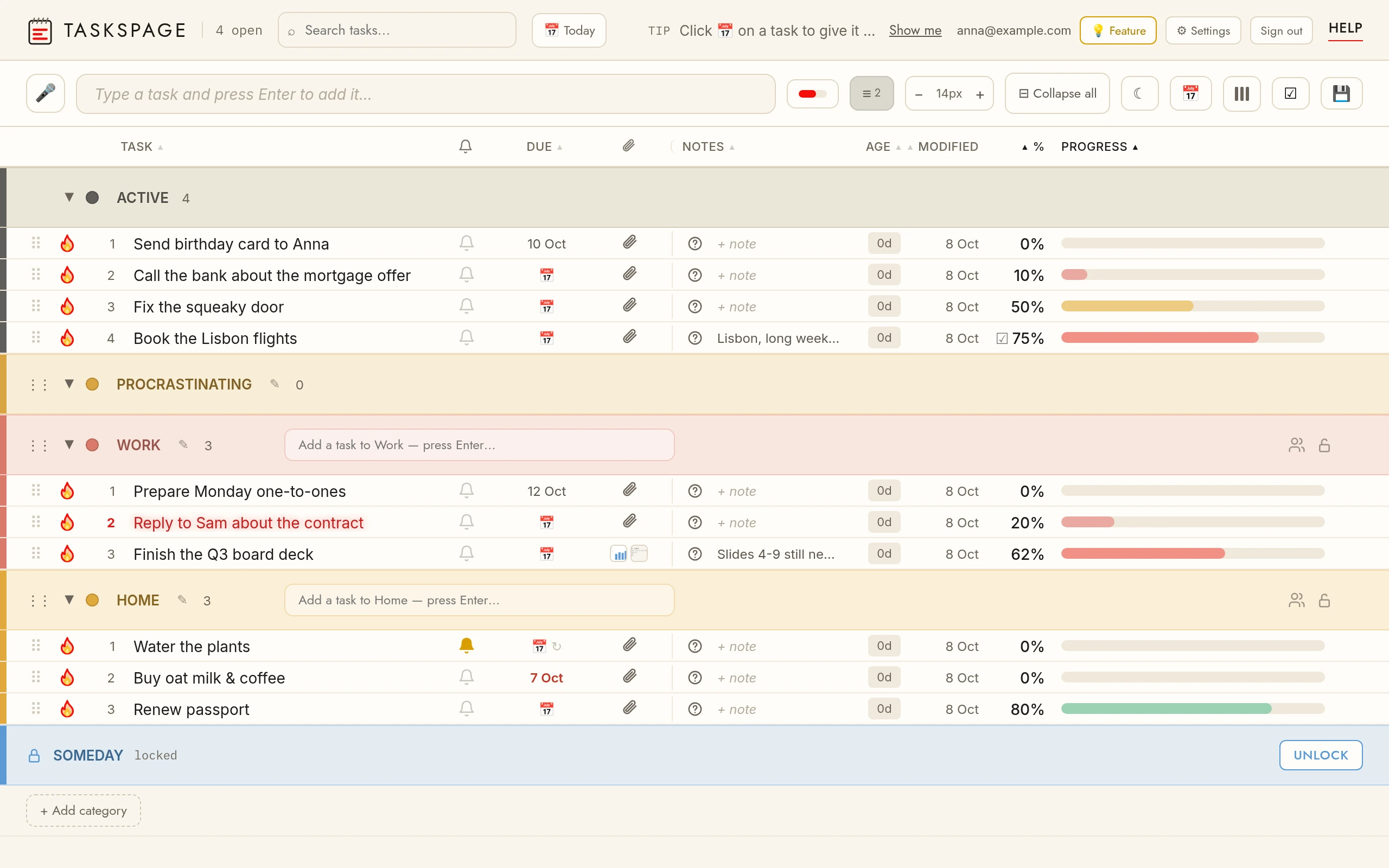
If you want a TickTick alternative that is genuinely simpler, TasksPage is a free, single-page to-do list you can open and use with no account. TickTick is a superb all-in-one app, but it asks you to sign up and packs in a calendar, habit tracker and focus timer you may never need. TasksPage does one thing: a fast, colour-coded list where every task has a progress percentage.
Updated:
Why people look for a simpler TickTick alternative
TickTick is deservedly popular, but it is built around an account and a broad feature set. To use it at all you must register with email, or continue with Google or Apple; there is no documented guest or offline-only mode, because the whole app is built around cross-device sync. That is the right trade-off for many people and the wrong one if you just want to jot a list without another login.
TasksPage takes the opposite stance. Open the app and start typing. No account is required; an optional free account only exists if you later want to sync across devices. Everything lives on one page with zero project-manager bloat. If you have felt that TickTick's calendar, habits, Pomodoro timer and Eisenhower Matrix are more than you need for a plain list, that is exactly the gap TasksPage fills. It is a simpler than TickTick tool by design, not by accident.
TasksPage vs TickTick at a glance
| TasksPage | TickTick | |
|---|---|---|
| Sign-up required | No — works with no account; optional free account for sync | Yes — email or Google/Apple; no guest mode |
| Price of a usable plan | Free forever (no ads, no tracking without your consent); Pro €1.99/mo or €19.99/yr (first 3 months free, no card) | Free forever with caps; Premium $3.99/mo, or $35.99–$49.99/yr depending on promotion |
| Best for | One simple personal list, kept on a single page | An all-in-one personal productivity hub |
| Platforms | Web, Android app (Google Play) + installable PWA (iPhone via Add to Home Screen) | Web, native iOS & Android, macOS, Windows, watches, browser extensions |
| Progress tracking | Drag a % on every task; list auto-sorts by completion | Checkbox done/not-done; subtasks (19 free, single-level) |
| Extras beyond a list | None — deliberately just the list | Calendar, habit tracker, Pomodoro timer, Eisenhower Matrix |
| Quick capture | Natural-language dates & times on Pro (“call mum tomorrow at 9am”, “in 2 hours”) set a reminder as you type; no recurrence or project parsing. | Strong natural-language date parsing ("call Sam tomorrow 3pm") |
| Privacy of a list | Password-protect any category (server-side gating, encrypted at rest; not end-to-end) | Basic sharing |
What TasksPage does well
The core idea is progress, not just ticking boxes. Every task carries a percentage you set by dragging, and the list auto-sorts so what is nearly done rises to the top. Around that you get colour categories (5 free, unlimited on Pro), notes, questions, file attachments (5 MB per file free, 5GB Pro), instant search, drag-and-drop reordering, a burn-to-done animation with undo, and true offline use as an installable PWA.
You can also password-protect any category for a private list — note this is server-side password gating with encryption at rest, not end-to-end encryption, and there is no password recovery. Pro (€1.99/mo or €19.99/yr) adds unlimited categories, reminders, recurring tasks, Google Calendar sync, calendar/ICS export. It is free forever with no ads and no tracking without your consent.
When TickTick is the better choice
To be fair, TickTick is the stronger product in several real ways, and if any of these matter you should pick it:
- Native mobile apps and wide sync. TickTick has real iOS and Android apps, macOS and Windows desktop apps, smartwatch support and browser extensions. TasksPage has no iPhone app — on iPhone it is a PWA you install from the browser; on Android there is an app on Google Play.
- Genuinely all-in-one. Tasks, a calendar, a habit tracker, a Pomodoro focus timer and the Eisenhower Matrix are bundled together. TasksPage deliberately has none of that.
- Fast capture. TickTick's natural-language parsing sets dates and reminders as you type. TasksPage's natural-language quick-add covers dates and times only (Pro) — not recurrence or projects.
- Simple, cheap pricing for a full suite. One free tier plus a single Premium at about $36–50/year (list price $49.99), with no confusing multi-tier or per-seat ladder.
Also be clear about what TasksPage is not: it has no team workspaces, assignees or comments, no other third-party integrations (Slack, calendar sync-in, Zapier, email-to-task), and a smaller ecosystem than an established app. It is a new, small indie product built for personal, single-page use — not projects or teams.
So which should you choose?
Choose TickTick if you want one app to run habits, focus sessions and a calendar across every device, and you do not mind creating an account. Choose TasksPage if you want a free, no-sign-up, single-page list where progress is front and centre and nothing gets in the way.
Open TasksPage and try it in seconds — no account needed. Or see how it stacks up against everything else in the full comparison of simple to-do list apps.
Key facts
| Price | Free forever. Pro is optional: €1.99 per month or €19.99 per year, billed in euro worldwide. Everyone gets Pro free for the first 3 months, no card needed. |
|---|---|
| Sign-up required | No. An account is only needed for sync across devices, attachments and sharing. |
| Works offline | Yes. Installable web app (PWA); offline edits sync when you are back online. |
| Platforms | Any modern browser on desktop, tablet and phone, plus an Android app on Google Play. No iPhone app (installable PWA via Add to Home Screen). |
| Attachments | Free: up to 5 MB per file, 50 MB in total. Pro: up to 25 MB per file, 5 GB in total. |
| Sharing | Share a colour category with up to 10 people, free. |
| Languages | English, German, Spanish, French, Portuguese, Russian. |
| Privacy | No ads, no tracking without your consent. Data encrypted at rest; export or delete everything from the app. |
Related pages
Frequently asked
Is there a free TickTick alternative?
Yes. TasksPage is free forever with no ads and no tracking without your consent. It covers the core of a personal to-do list — colour categories, notes, attachments, search and per-task progress — at no cost. An optional Pro plan (€1.99/mo or €19.99/yr) adds unlimited categories, reminders, recurring tasks and Google Calendar sync.
Can I use a TickTick alternative without an account?
TasksPage works with no account at all — open it and start typing. TickTick, by contrast, requires you to register with email or continue with Google/Apple, and has no documented guest mode. With TasksPage, an account is optional and only needed if you want to sync across devices.
Is TasksPage really simpler than TickTick?
Yes, by design. TickTick bundles a calendar, habit tracker, Pomodoro timer and Eisenhower Matrix. TasksPage is a single page with just your list, colour categories and a progress percentage per task. If TickTick feels like more than you need, TasksPage removes the clutter.
Does TasksPage have mobile apps like TickTick?
Partly. TasksPage has an Android app on Google Play (the same page, packaged for Android), but no iPhone app: on iPhone you install it as a PWA from Safari, which works offline. TickTick has full iOS and Android apps plus desktop and smartwatch versions. If native mobile apps are essential, TickTick is the better fit.
What can TickTick do that TasksPage cannot?
Quite a lot: native mobile and desktop apps, wide cross-device sync, richer natural-language quick-add (recurrence, lists), a built-in calendar, habit tracking and a focus timer, plus team sharing and integrations. TasksPage has no team workspaces, assignees or comments and no other third-party integrations. It is aimed only at simple, personal, single-page use.
One page. No sign-up. Start now.
Open TasksPage