TasksPage: the simpler, no-sign-up Todoist alternative
If you want a Todoist alternative that skips the account, the projects and the structure, TasksPage is a free single-page to-do list you can start using right now with no login. It is deliberately simpler than Todoist: one page, drag-to-set progress percentages, and zero setup. But it is a new, small indie product, so if you need mobile apps, teams or integrations, Todoist is still the stronger pick, and this page says so plainly.
Updated:
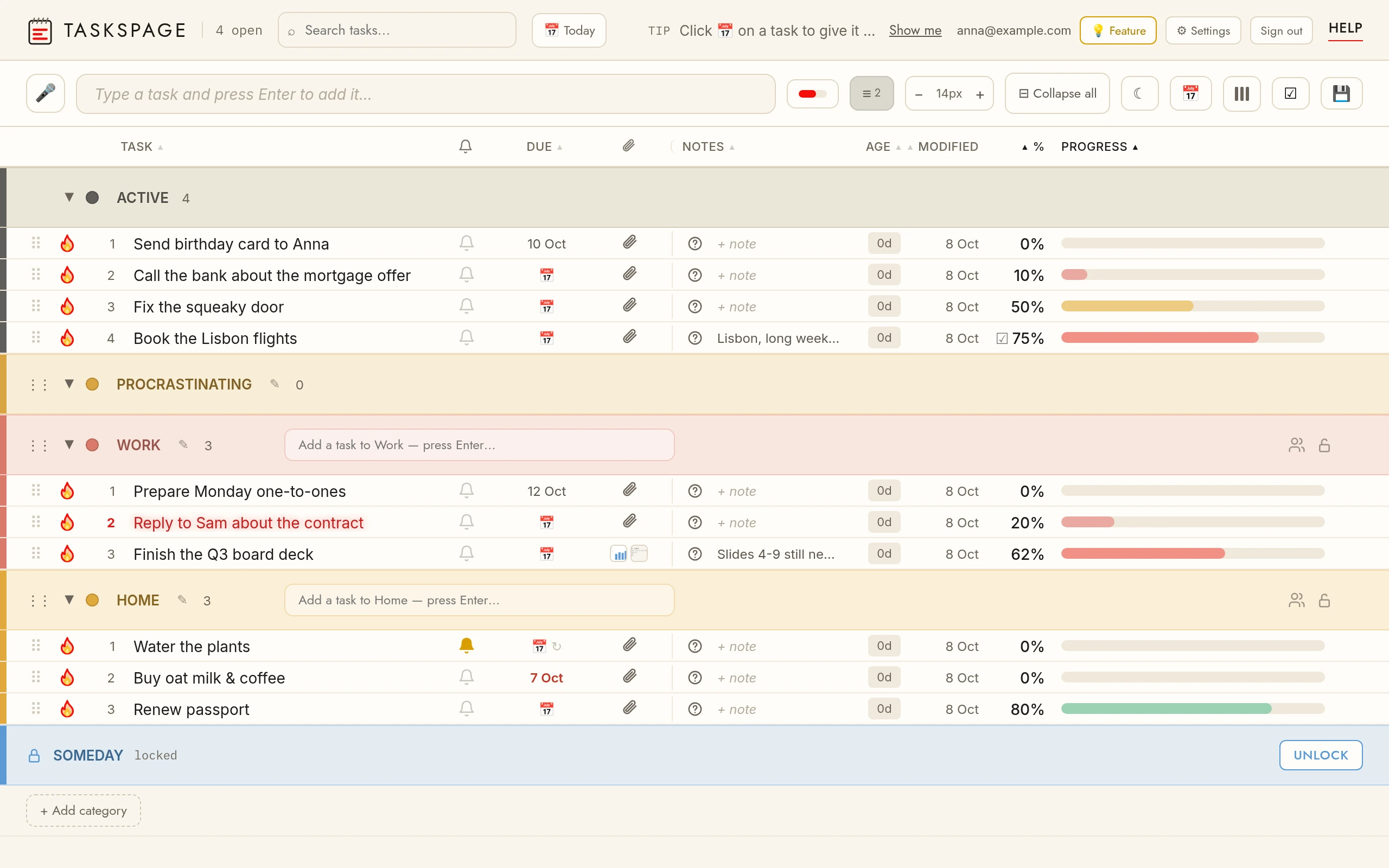
Why pick TasksPage over Todoist
TasksPage exists for one job: a personal checklist that lives on a single page with no friction. There is no account wall, no onboarding, no gamified Karma score, and no forest of projects, sub-tasks, labels and filters. You open the app and start typing.
The signature difference is progress. Every task has a completion percentage you set by dragging, and the list auto-sorts by how done things are. That suits work that is rarely a clean tick-box, which a binary checkbox cannot show. You also get colour categories (5 free, unlimited on Pro), password-protected categories, notes, questions, file attachments, instant search, drag-and-drop reordering, a burn-to-done animation with undo, and full offline use as an installable PWA.
TasksPage is free forever with no ads and no tracking without your consent. Pro is €1.99/month or €19.99/year and adds unlimited categories, reminders, recurring tasks, Google Calendar sync, calendar/ICS export, and 5GB of storage. If you have ever felt Todoist was more app than your to-do list needed, that is exactly the gap TasksPage fills.
TasksPage vs Todoist at a glance
| TasksPage | Todoist | |
|---|---|---|
| Sign-up required | No. Works with no account; a free account is optional, only for cross-device sync. | Yes. You must create an account before adding any task; no guest mode. |
| Price of a usable plan | Free forever. Pro €1.99/mo or €19.99/yr (first 3 months free, no card). | Free "Beginner" plan (no time limit). Pro ~$60/yr; Business ~$96/user/yr. |
| Best for | A personal, single-page checklist with zero bloat. | Structured projects, mobile-first use, and teams. |
| Platforms | Web, Android app (Google Play) + installable PWA (iPhone via Add to Home Screen). | Web, iOS, Android, macOS, Windows, Linux, browser extensions, watches. |
| Task progress | Drag-to-set percentage; auto-sorts by completion. | Binary complete/incomplete, with priorities. |
| Quick-add | Natural-language dates & times on Pro (“call mum tomorrow at 9am”, “in 2 hours”) set a reminder as you type; no recurrence or project parsing. | Best-in-class natural-language quick-add (dates, recurrence, project). |
| Integrations | Google Calendar sync and calendar (.ics) export on Pro; no Slack, calendar sync-in, Zapier or email-to-task. | Large ecosystem: calendar, email, Slack and more. |
| Free-tier limits | 5 colour categories, default column layout, 5 MB per file. Reminders, due dates, view customization and important-task glow are Pro. | 5 active projects, custom reminders paywalled, 300 tasks/project. |
When Todoist is the better choice
To be fair, Todoist is an excellent product and beats TasksPage in several real ways:
- Everywhere, natively. Todoist has genuine iOS, Android, macOS and Windows apps plus browser extensions and watches, with seamless real-time sync (on Linux it runs via the web app). TasksPage is web plus an Android app on Google Play and an installable PWA; there is no iPhone app.
- Natural-language quick-add. Typing "Pay rent every 1st at 9am #Home" and having it parsed into a recurring, dated, filed task is genuinely excellent, and TasksPage parses dates and times on Pro (“tomorrow at 9am”), but has nothing like this for recurrence or project filing.
- Structure and teams. Projects, sub-tasks, labels, filters and shared team workspaces (on Business) are things TasksPage deliberately does not do. If you manage multi-step projects or collaborate, Todoist wins.
- Ecosystem. Todoist connects to calendars, email, Slack and hundreds of tools. TasksPage has no third-party integrations — the only exceptions are Google Calendar sync and a calendar (.ics) export, both on Pro.
Todoist's free plan is also genuinely usable with no time limit, though it caps you at 5 projects and reserves custom reminders for Pro. If any of the above matter to you, stay with Todoist, honestly.
The honest verdict
Choose TasksPage if you want something simpler than Todoist: a free, no-sign-up, single-page list with progress percentages and no bloat, for personal use. Choose Todoist if you need native mobile apps, natural-language input, projects, integrations or team sharing.
The fastest way to decide is to try it, since no account is needed. Open TasksPage and add a few tasks, or read the full comparison of simple to-do list apps to see how it stacks up against the rest.
Key facts
| Price | Free forever. Pro is optional: €1.99 per month or €19.99 per year, billed in euro worldwide. Everyone gets Pro free for the first 3 months, no card needed. |
|---|---|
| Sign-up required | No. An account is only needed for sync across devices, attachments and sharing. |
| Works offline | Yes. Installable web app (PWA); offline edits sync when you are back online. |
| Platforms | Any modern browser on desktop, tablet and phone, plus an Android app on Google Play. No iPhone app (installable PWA via Add to Home Screen). |
| Attachments | Free: up to 5 MB per file, 50 MB in total. Pro: up to 25 MB per file, 5 GB in total. |
| Sharing | Share a colour category with up to 10 people, free. |
| Languages | English, German, Spanish, French, Portuguese, Russian. |
| Privacy | No ads, no tracking without your consent. Data encrypted at rest; export or delete everything from the app. |
Related pages
Frequently asked
Is there a free Todoist alternative?
Yes. TasksPage is free forever with no ads and no tracking without your consent. The free tier covers 5 colour categories, notes, attachments, search and offline use. An optional Pro plan (€1.99/month or €19.99/year) adds unlimited categories, reminders, recurring tasks and more.
Can I use a Todoist alternative without an account?
With TasksPage, yes. It works entirely with no sign-up; your list is available the moment you open the app. A free account is optional and only needed if you want to sync across devices. Todoist, by contrast, requires you to create an account before adding any task.
Is TasksPage simpler than Todoist?
Yes, by design. TasksPage keeps everything on one page with no projects, sub-tasks, labels or filters. Its standout feature is a drag-to-set completion percentage per task, with the list auto-sorting by progress. If Todoist's structure feels like overkill for a personal checklist, TasksPage is the simpler option.
Does TasksPage have mobile apps and integrations like Todoist?
No, and this is the honest trade-off. TasksPage has no iPhone app (on iPhone it is an installable PWA; on Android there is an app on Google Play), no team workspaces, assignees or comments, and no integrations such as Slack, calendar sync-in or Zapier. If you need those, Todoist is the better choice.
What does TasksPage do that Todoist doesn't?
The main one is progress percentages: every task has a completion level you set by dragging, and tasks auto-sort by how done they are, rather than being a simple checkbox. TasksPage also works with no account at all and password-protects individual categories (server-side gating, encrypted at rest, not end-to-end).
One page. No sign-up. Start now.
Open TasksPage